Overview
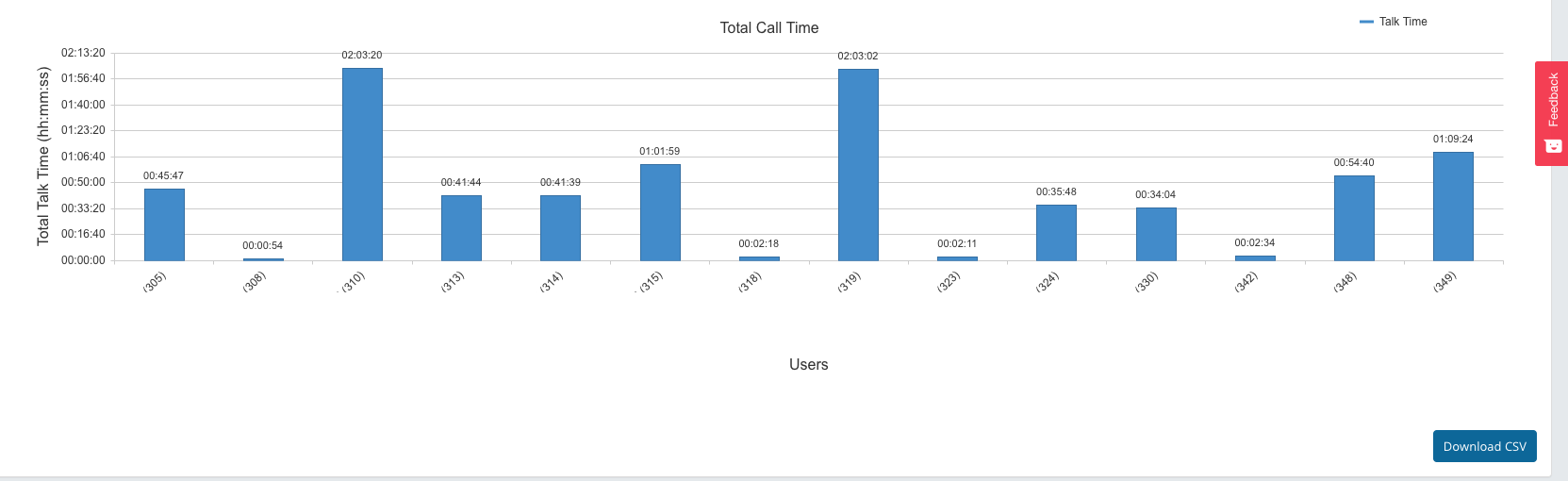
The 'Active Users' report shows the total time users spent on calls. Reports are filtered by the direction of the call, the office, and time period selected.
Usage
- Select any time period with a maximum of 7 days between them.
- Select your 'Call Direction':
- All
- Internal (This will only display calls made internally.
- Inbound (This will only display inbound calls. (calls that you answered).
- Outbound (This will only display outbound calls (calls that you made).
- Select the 'office', or simply select 'all offices'.
Group by: You can choose to group by extension number, or by the users' name by using the  slider.
Tip
You can also choose between a bar graph and a pie chart by clicking the button in the top right-hand corner of the graph.


Detailed Report
Column Name | Description |
|---|---|
UserExtension | The extension number of the User. |
UserName | The name of User as set up in the configuration of uPBX. |
TotalSessionCount | The total number of times the User spoke on calls. |
InboundSessionCount | Total number of times the User spoke on Inbound calls. |
OutboundSessionCount | Total number of times the User spoke on Outbound calls. |
TotalUserTalkTIme | Total time the User spent talking on the phone. |
TotalOverallUserTime | Total time the User’s extension/s rang and/or spoke on the phone. |
AvgUserTalkTime | The Average time the User spoke on each session. |
AvgOverallUserTime | The average Overall time the User’s extension both rang and/or spoke. |
OriginOffice | The Office Name as labelled in uPBX. |